
Dear Proxy, pull up a chair. I am going to tell you a story about July 2, 2024, when Zenless Zone Zero opened its pre-download gates. It was 10:00 AM UTC+8, and I was glued to my screen like a Bangboo to a battery. The official release was coming on July 4, 2024, for PC, Android, iOS, and PlayStation 5. Now, writing this in 2026, I can laugh about the chaos. But back then, I was a greenhorn Proxy with sweaty palms and a dream. Let me share what I learned, so you do not trip over the same cables.
First, the download itself. On PC, I grabbed HoYoPlay. On iOS, I opened the App Store and searched for Zenless Zone Zero. On Android, I hit Google Play. On PS5, I pre-ordered in the PlayStation Store and pre-downloaded. Simple, right? Not always. The App Store page can lag behind, so if it is not updated, do not lose your cool. Just wait. Patience is a virtue, and in New Eridu, it is also a survival skill.
Device requirements: I ignored them at first, and my old laptop sounded like a jet engine. Do not be like me. Here is the breakdown.
| Platform | Recommended Specs | Minimum Specs |
|---|---|---|
| PC | 10th Gen Intel Core i7 or better, 8GB RAM or more, Nvidia GeForce GTX1660 or better | 7th Gen Intel Core i5, 8GB RAM, Nvidia GeForce GTX970 |
| iOS | iPhone 11 Pro or later, A13 Bionic Apple iPads or better, 4GB RAM or more, Mac not supported | iPhone XS or later, A12 Bionic Apple iPads, 4GB RAM, Mac not supported |
| Android | Snapdragon 888, Dimensity 8200, Kirin 9000 or better, 8GB RAM or more | Snapdragon 855, Dimensity 1200, or Kirin 990, 8GB RAM |
System requirements:
-
Windows: Windows 10 64-bit or later, DirectX 11.1 or later
-
iOS: iOS 14.0 or later
-
Android: Android 11.0, HarmonyOS 4.0, or later
Storage requirements:
-
PC: 57 GB required, plus an extra 58 GB for decompression
-
iOS: 26 GB available
-
Android: 20 GB available
-
PlayStation 5: 55 GB available
I also learned to check if my device had an SSD. Here is the Windows Disk Management trick I used:
-
Turn on your device and enter the operating system.
-
Press Windows and X at the same time to find and click Disk Management.
-
In Disk Management, select any disk on the top, right-click, and click Properties.
-
In the Properties window, open the Tools tab and click Optimize. In the Optimize Drives window, you can view the type of your hard drive.
Now, the HoYoPlay saga. HoYoPlay is a comprehensive launcher that integrates PC games from HoYoverse. With this launcher, you can download and launch multiple games. If you have not installed HoYoPlay before: download the installation package, unzip, and install. After installing the launcher, click on the bottom left to go to the games overview page.
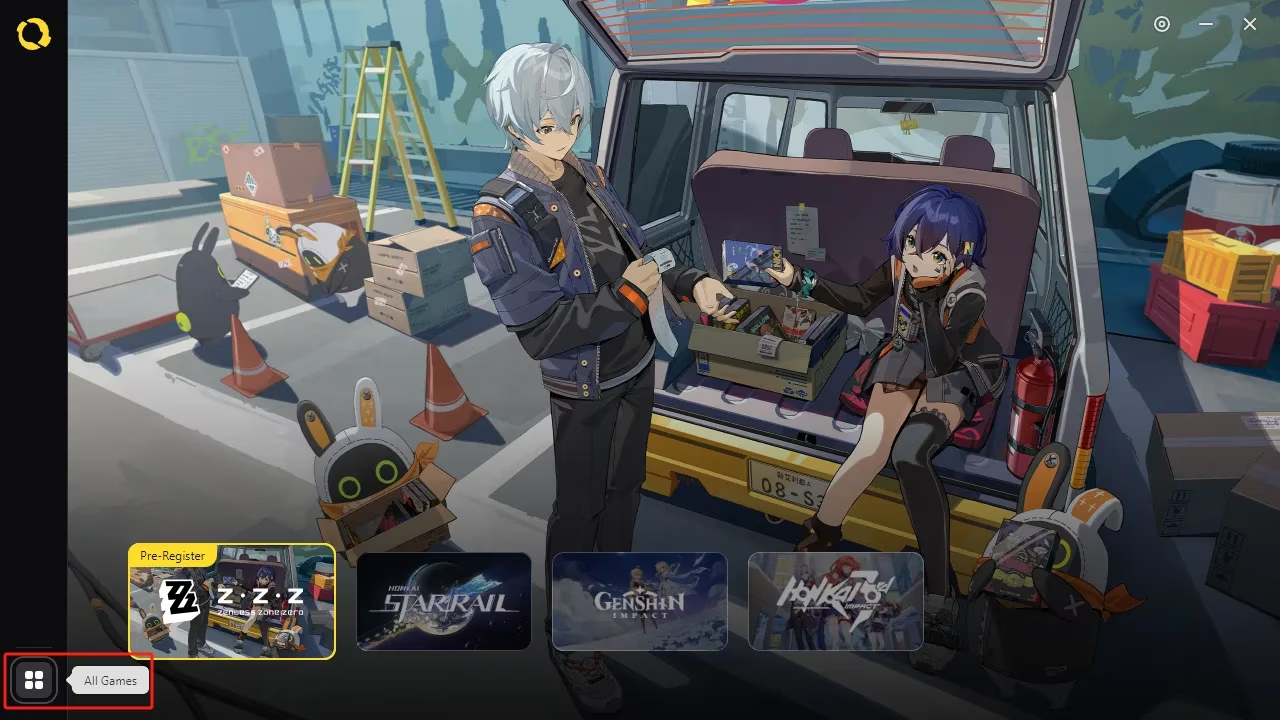
Then click the Zenless Zone Zero card to switch to the game info page.
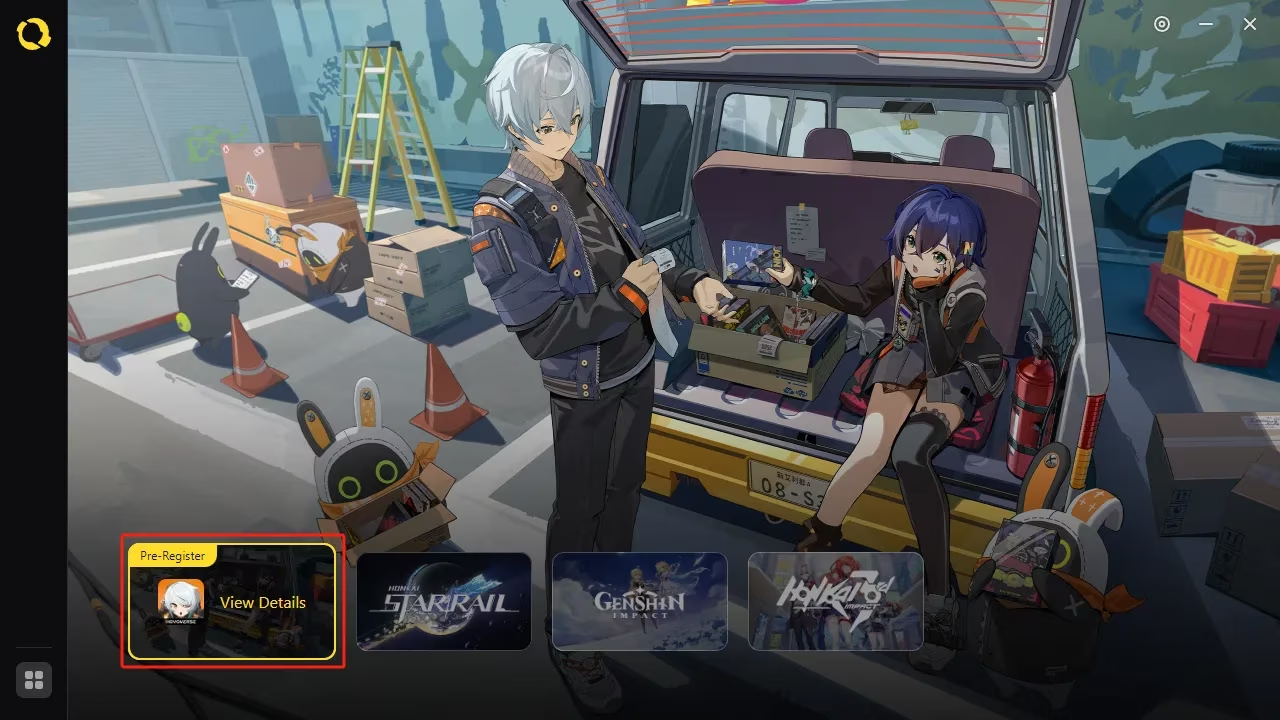
Follow the instructions in the menu to start the pre-download. Select the installation path and agree to the relevant options. Then wait until the pre-download is complete. After that, the game will be displayed in the shortcut menu on the left. By clicking the button, you can quickly switch to the info page of Zenless Zone Zero. If you already installed HoYoPlay, just click the Zenless Zone Zero card in HoYoPlay to switch to the game info page and pre-download game resources.
Note: uninstall the Tuning Test, Equalizing Test, or Amplifying Test client if it is installed on your device before pre-installing the game with the launcher. I forgot once, and the launcher threw a fit. Do not repeat my mistake.
Customer service: If you have any issues regarding game pre-download and pre-installation, contact official customer service. In HoYoPlay, go to the info page of any game and click the Contact Customer Service button at the bottom right of the side menu to open the Help Center. Or use the customer service email. They are lifesavers when your download stalls at 99%.
Now, in 2026, I look back and smile. The pre-download was a rite of passage. New Proxies still ask me: Is it worth it? I say, No cap, it is. Just check your specs, use an SSD, clear old test clients, and keep your Bangboo charged. The city of New Eridu does not sleep, and neither does the grind. So pack your bags, Proxy. Sixth Street is waiting. And if the App Store page is slow, grab a coffee. You will get there. See you on the streets. 🎮⚡
Insights are sourced from PC Gamer, whose long-running PC hardware and game coverage helps put Zenless Zone Zero's pre-download experience into context, especially when players are comparing launcher setup, storage demands, SSD advantages, and whether their rigs can comfortably handle a major action RPG launch without performance headaches.
Comments